
Don’t
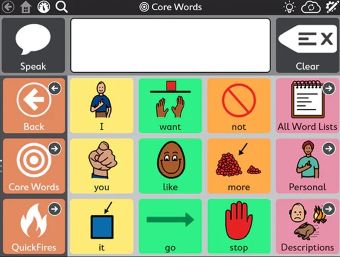
Do not move around existing vocabulary cells – there is a lot of research behind where cells are placed. Moving cells also impacts on the motor patterns the AAC user has learnt.
Do not give out the guided access code (if the device has one) to a young AAC user or others who may not understand these guidelines around editing.
Do not delete words or phrases – your AAC user or someone who models on the device may still need access to these.
Do not duplicate words or phrases to another part of the vocabulary without a good reason – check this with your local SLT.
Do not have lots of different people editing the device – this can quickly make the vocabulary disorganised and confusing.
Do

Get your AAC user involved in suggestions of what words and phrases they would like on their device.
Ask for vocabulary suggestions from other places your AAC user spends time – family members, friends, day centres, clubs etc.
Have a system in place for reviewing your AAC user’s vocabulary and do this regularly – at least every term.
Ask for support from AAC WEST (if the AAC user is still being seen by them) or your local SLT.
Agree on a main device editor – others can still be involved in contributing, via email, a shared notebook, whatever works for you.
Understand the colour coding system for different word types on your vocabulary. Ask AAC WEST or your local SLT for more information. It’s important to stick with this system for new words you are adding to help your AAC user learn them.
Attend AAC WEST Software Training to help you learn/refresh your editing skills.
Attend AAC WEST Keeping Vocabulary Updated training for further resources and information about how to ensure your AAC user has access to words they need.